The whole company runs on n8n flows. Look closely at one: a trigger fires, then each node does one thing — read Airtable, call an API, post to Slack — and hands its result to the next, until the last node produces an output. That is exactly what an AI agent is: a set of tools plus instructions. The only real difference is who decides the order. In an n8n flow a human drew every arrow in advance. In a real agent the model decides — every run. This page shows, in plain language, how a flow maps onto a prompt + tools, and why our flows aren’t true agents yet.
1 node= 1 tool
arrows= the prompt
trigger= the input
last node= the output
The shape we’re building toward
One Maestro, many agents, each a bundle of workflows.
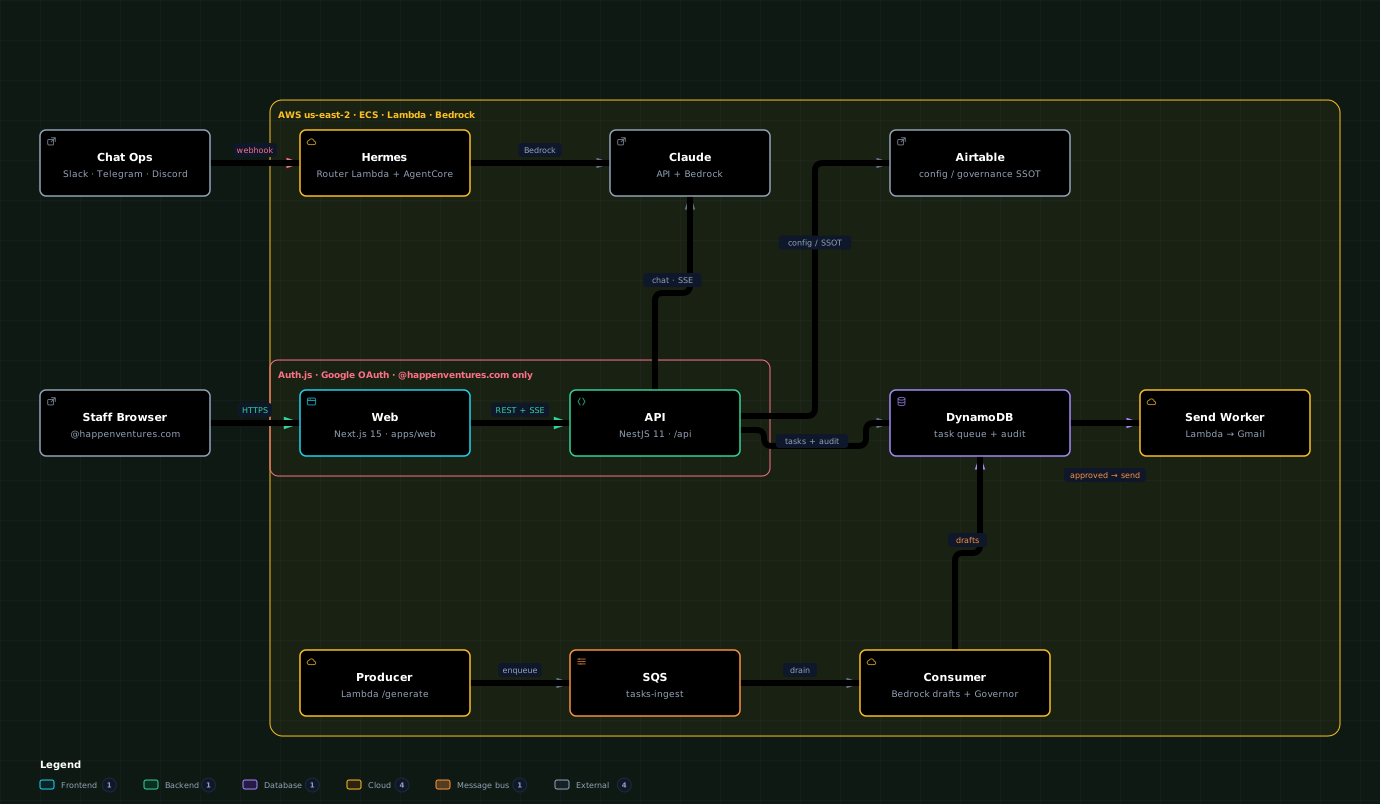
Here is the whole target in one picture. Maestro sits on top — it holds the global governance, the rules and the settings (it’s where the Governor gate lives). Under it, one agent per domain: Gabrielle for sales, Robin for R3 ops, Frank for finance, Jacob for junk. Under each agent live its workflows — but a workflow here is no longer an n8n canvas: it’s a skill, a prompt that carries the same instructions the flow used to encode. Every agent reaches the outside world through one shared tool set, and humans steer the whole thing from a single UI layer.
Animated · interactive — the Maestro + agents runtime shape: one Maestro on top, one agent per domain, each a bundle of workflow-skills reaching the outside world through one shared tool set. Open interactive ↗
Conventions
Maestro — governance · rules · settings (the gate)Agent — one per domainWorkflow — a skill (prompt + instructions)Shared tool — an external systemUI layer — where humans steer itsolid — runtime calldashed — configure / control
A workflow is a skill, not a canvas
Each box under an agent used to be an n8n flow. In this shape it becomes a skill: a single prompt that holds the trigger, the steps and the rules the flow used to draw — plus the handful of tools it needs. The agent owns a library of these skills; Maestro decides which ones it’s allowed to run and under what guardrails.
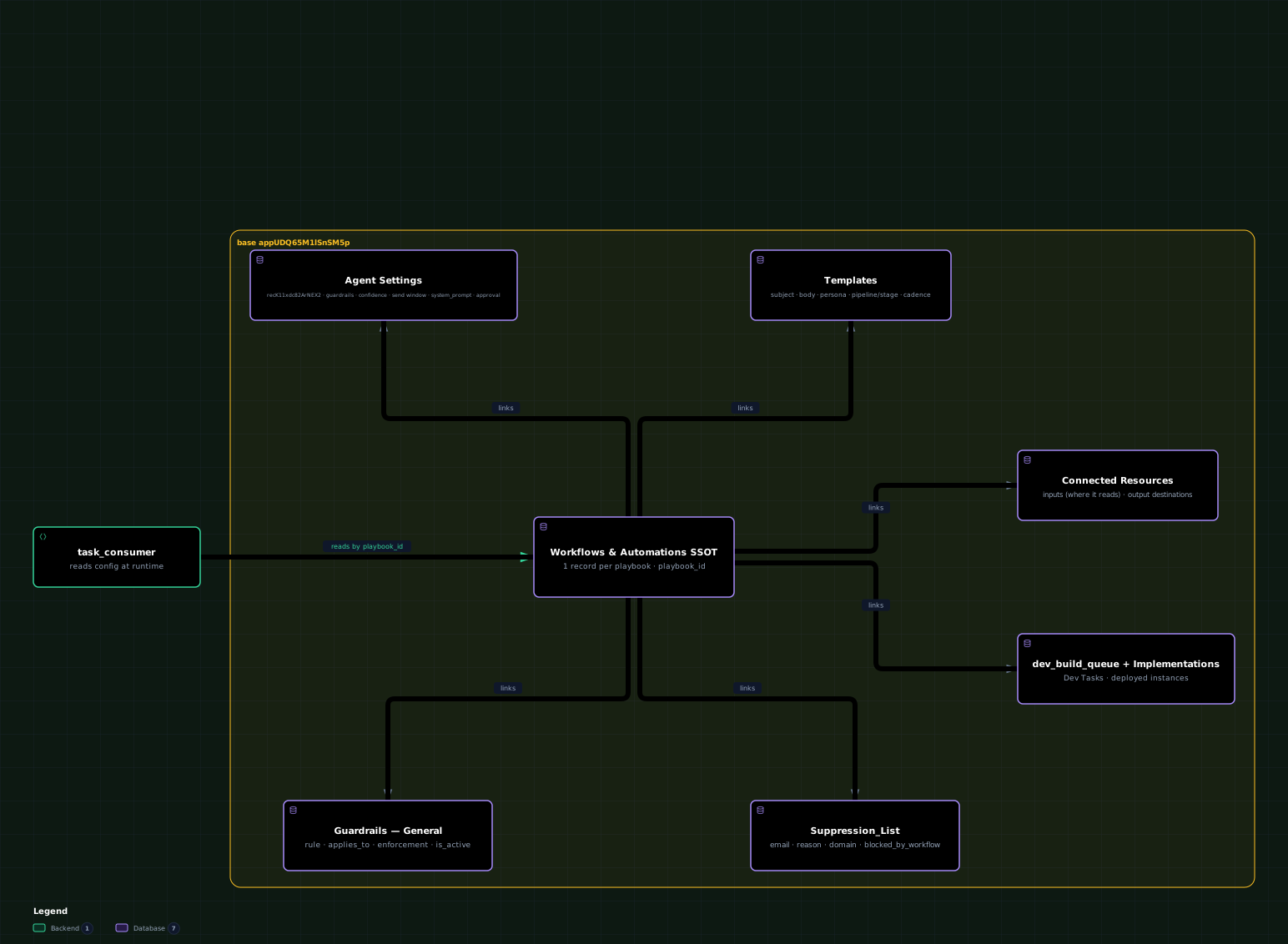
Animated · interactive — the config brain those settings live in: Agent Settings, Workflows and Guardrails in Airtable, the SSOT every agent reads its persona and rules from. Open full ↗
How an order runs
You give the agent an order — it loads the skill
Say you tell Gabrielle: “run the deal follow-up for Acme.” The agent doesn’t hop onto an n8n canvas. It finds the matching skill, reads its instructions, and runs it — often in a separate context window (a fresh sub-agent loaded with just that skill and its tools) so the work stays focused — then hands the result back.
Running one workflow
Order“Gabrielle, run the deal follow-up for Acme.” — a goal handed to the agent (by a human in the UI, a cron, or another agent).
Load skillThe agent picks the matching workflow-skill (DFU-01) and reads its prompt — the same instructions the old n8n flow encoded.
↻ RunIt runs the skill, often in a separate context window — a sub-agent loaded with only that skill + the tools it needs — so a big job doesn’t crowd the main agent.
↻ Use toolsThe skill calls the shared tools (Airtable, HubSpot, WhatsApp, Slack, QuickBooks, Instantly, LGM) to actually do the work.
ReturnIt returns the answer to the agent — a draft for the Hub /tasks-v2 to review, or a completed action — and Maestro’s Governor logged the whole thing.
Why a separate context window
Running a heavy workflow inside the agent’s own conversation would bloat its context and blur its focus. Spinning up a fresh context window per workflow keeps each run clean: it gets only the skill’s instructions and the tools that skill is scoped to — then it reports back a tidy result. Same idea as the kill-switch and human review: the agent stays in control, the work stays contained.
Strip the canvas away
What an n8n flow really is
Hide the pretty boxes and wires and you’re left with four things — and every one of them has a name in the world of agents.
Part 1
The trigger is the input
A webhook, a cron, a new email. It’s the moment the work starts and the data it starts with. For an agent, that’s simply the goal and the context you hand it.
Part 2
Every node is a tool
An “Airtable: Get rows” node, an “HTTP Request”, a “Slack: Post”. Each one is a single capability with inputs and an output. That is the definition of a tool.
Part 3
The wiring is the instructions
The arrows, the IF/Switch branches, the “do this, then that”. A human encoded the logic by drawing it. In an agent, that same logic lives as sentences in the prompt.
Part 4
The last node is the output
The final Slack message, the row written, the task created. The end of the chain is just the agent’s answer — the thing the run was for.
A flow, seen as tools
TriggerWebhookDriver sends a WhatsAppinput
→
NodeClassifyLLM: what kind of problem?tool
→
NodeAirtable GetFind the open order(s)tool
→
NodeIFOrder matched?wiring
→
NodeHTTP PostCreate the review tasktool
→
EndSlackNotify the channeloutput
The model, if there even is one, is just a node
In most of our flows there is no model at all — the “reasoning” is the set of arrows a person drew once. Even when a flow does call an LLM (like the “Classify” node above), the model is a passenger: it answers one question and hands control straight back to the wiring. It never decides what to do next.
Same parts, a different driver
What a real agent is
An agent is two things: a prompt (the goal plus the rules) and a set of tools (each with a name and a little schema of inputs). You hand the model the goal; it picks a tool, reads the result, picks the next, and stops when the goal is met. Nobody draws the arrows — the model derives them, live, from the goal and from what it sees on each step.
The agent loop
PromptThe goal + the policy. “Handle this driver exception: find the affected order, classify it, file one review task. If you can’t match an order, file a no-order task instead.”
Toolsclassify_exception · lookup_orders · file_task · notify_driver — the same capabilities the nodes had.
↻ DecideThe model reads the goal and the situation, and chooses the next tool to call.
↻ ActIt calls that tool with arguments it filled in itself.
↻ ObserveIt reads the result and loops back to “Decide” — for as many steps as the problem needs.
OutputWhen the goal is met, it stops and returns the result — the task filed, the message sent.
The flowchart is no longer drawn — it’s re-derived every run
In n8n the path classify → lookup → if-matched → file is fixed concrete; you drew it. In an agent that path is just one likely route the model takes — and when reality doesn’t match the flowchart (two orders match, the driver sent a photo, the site code is ambiguous) the model adapts, because it’s reasoning toward the goal, not following rails.
The translation
Same flow, mapped onto a prompt + tools
Nothing is lost when you translate a flow into an agent. The nodes become tools; the wiring becomes words. What changes is that the words are advice, not rails.
n8n flow
The part you build on the canvas.
Trigger node
Action nodes
Airtable · HTTP · Slack · Gmail
Arrows · IF · Switch
Code · Set nodes
Last node
becomes
→
→
→
→
→
agent
A prompt + a list of tools.
The input / goal
What you hand the agent when it runs.
Tools
One per capability, each with a name + input schema.
Sentences in the prompt
“If you can’t match an order, file a no-order task.”
A tool, or a line of the prompt
The agent’s answer
Worked example
The driver-exception flow, both ways
Here is a real Robin flow — a driver messages that something’s wrong at a site — written first as the n8n we run today, then as the agent it could be. Same tools. Same goal. Different driver.
Today · n8n flow
A fixed chain you drew
Webhook — driver WhatsApp comes in
Classify (LLM node) — one prompt: what sub-type?
Airtable: Get — find Pickup-Scheduled orders for the site
IF — order matched? yes ↓ / no → other branch
Set / Code — build the task payload
HTTP: POST /ingest — file the review task
Slack — post to #robin-alerts
Every branch had to be drawn ahead of time. A case nobody drew — two orders match, a photo instead of text — falls through.
The shift · agent
A prompt + the same tools
# system prompt
You are Robin's driver-exception handler.
A driver reported a problem at a site.
Goal: figure out which order(s) it
affects, classify the exception, and file
one review task for Joan.
If you can't match an order, file a
"no-order" task instead. Never file twice.
classify_exception(message) → sub_type
lookup_orders(site) → orders[]
file_task(site, orders, sub_type, summary)
notify_driver(phone, text)
The model picks the order of calls itself — and handles the cases you never drew, because it’s reasoning toward the goal.
Read the two columns side by side
The tools are identical — lookup_orders, file_task, notify_driver are the same capabilities the nodes wrapped. The IF branch became one sentence in the prompt (“if you can’t match an order…”). The chain of arrows disappeared — the model sequences the calls. That’s the whole translation.
The honest part
Why our flows aren’t true agents — yet
Calling an LLM from a node does not make a flow an agent. The test is simple: who chooses what happens next? Today, the canvas does. In an agent, the model does.
n8n flow · today
Deterministic, human-wired
The path is fixed at build time. It’s predictable and easy to read — but brittle at the edges: every new case needs a new branch drawn by a person. The LLM, if present, is a passenger. This is most of what we run today, and it works.
Agent · the shift
Model-orchestrated
You give it tools and a goal; it derives the path each run and handles cases nobody pre-drew. More flexible, and it degrades gracefully — but it needs guardrails, evaluation and good tools, or it wanders. The LLM is the driver, not a passenger.
01
List every node → name the tools
Walk the canvas. Each action node (Airtable, HTTP, Slack, Gmail, a Code block that does one job) becomes a tool: a name, a one-line description, and the inputs it needs.
nodes → tool definitions
02
Turn the trigger into the input
Whatever fires the flow — the webhook body, the new row, the email — is the context you hand the agent along with the goal for this run.
trigger → input + goal
03
Move the wiring into the prompt
Every IF, every Switch, every “then do this” arrow becomes a plain-language rule in the system prompt. This is where the human’s logic goes — but now as policy the model can apply with judgement, not a hard rail.
arrows / IF → prompt policy
04
Hand the model the tools + the goal
Give it the tool list and the instructions, and step back. No connections to draw. The model reads the goal, looks at the input, and decides where to start.
prompt + tools → model
05
Let it loop instead of following arrows
It calls a tool, reads the result, decides the next call, and repeats until the goal is met — then returns the output. The flowchart you used to draw is now re-derived on every run, for free.
decide → act → observe → repeat
Guardrails don’t disappear — they move
The safety we get “for free” from a fixed flow (it can only do what we wired) must be rebuilt deliberately for an agent: scoped tools (it can only call what we give it), a kill-switch (the SSOT Status), human review before anything sends (Hub v2), and evaluation of its decisions (the learning loop). That’s why the move is gradual — agent where judgement helps, flow where a fixed path is safer.
The one-liner
A flow is an agent’s transcript, frozen
We drew the reasoning once, by hand, and saved the drawing. A real agent re-derives that reasoning on every run — so it handles the cases we never drew. Same tools. Same goal. The model holds the pen instead of us.
Complement · Agent Org Map (for Jess)
The agents, and what sits on top
A companion to the question Jess asked — every AI agent in Agent Settings, organized by department, each with the lead agent that sits on top and the subagents below it, plus the Maestro runtime that holds it all together. Click any agent in the map for detail; dashed cards are proposed (build gaps).
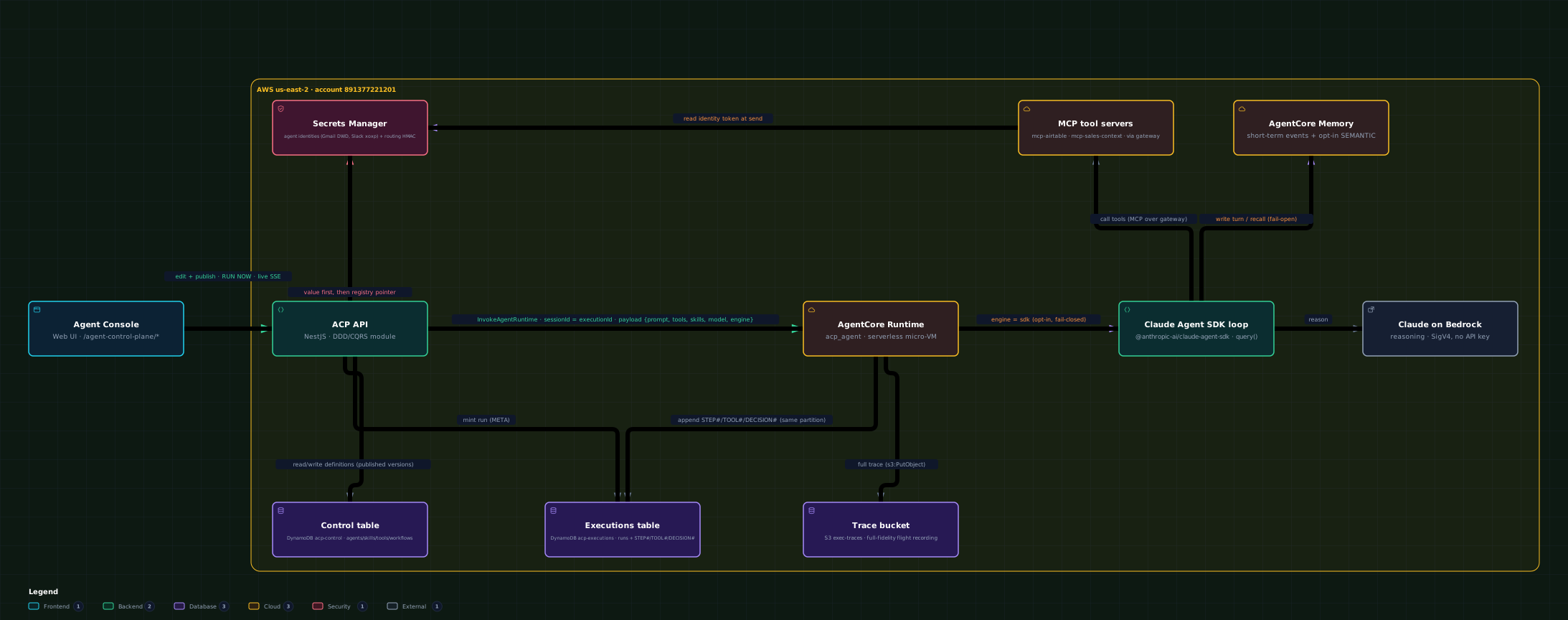
An agent is a definition an admin writes in a console — name, instructions, model, tools, skills, secrets, a memory setting — that gets published and then run on a serverless runtime. That machinery is the Agent Control Plane (ACP): a console, a runtime, and the storage that holds both the definitions and the record of every run. Everything is done from the UI — no deploy.
Animated · interactive — the three planes: console (build + publish), runtime (Claude Agent SDK on Bedrock AgentCore), and the stores that hold definitions, runs and full traces. Open interactive ↗
Console
Build & publish
Define an agent under /agent-control-plane — tabs for Scenarios, Approvals, Runs, Memory, Properties, Audit, Settings. It is versioned: only a published version ever runs, never the draft. Skills, secrets and MCP tools are global registries you bind to an agent.
Runtime
Claude Agent SDK on Bedrock
The new engine is @anthropic-ai/claude-agent-sdk (ADR 0033) running a real query() loop on Bedrock AgentCore — a serverless micro-VM. It reasons on Bedrock (SigV4, no API key); skills materialise to .claude/skills/<slug>/SKILL.md. Engine, model and tools fail closed.
Storage
Definitions · runs · traces
DynamoDB acp-control (agents/skills/tools/workflows) + acp-executions (runs + STEP#/TOOL#/DECISION# trail) + S3 exec-traces (full text). Secret values live only in Secrets Manager. Native memory is AgentCore Memory (short-term + opt-in SEMANTIC) — and it fails open.